Multi-Board Qt 6 with Yocto: Running the Same App on Raspberry Pi CM4 and BeagleBone Black
We build Qt Quick dashboards for embedded hardware. The requirement is always the same: a custom Linux image that boots straight into our application over Wayland, with nothing else running. Yocto gives us that — precise control over the kernel, init system, display stack, and Qt modules in a reproducible build.
Our first target was the Raspberry Pi CM4. It went smoothly. Then we added the BeagleBone Black, and that's where this post gets interesting.
Repository: github.com/learnqtkenya/yocto-qt6-builds
The Two Boards
| Raspberry Pi CM4 | BeagleBone Black | |
|---|---|---|
| SoC | BCM2711 (Cortex-A72, quad-core) | AM3358 (Cortex-A8, single-core) |
| RAM | 8 GB | 512 MB |
| GPU | VideoCore VI (VC4, open-source DRM) | PowerVR SGX530 (no open-source driver) |
| Storage | microSD (Lite variant, no eMMC) | 4 GB eMMC + microSD |
| Qt rendering | Hardware-accelerated OpenGL ES | Software (llvmpipe) |
| Yocto BSP | meta-raspberrypi | meta-yocto-bsp (in Poky) |
These boards have almost nothing in common besides running Linux and having an HDMI output. That's the point — if the build system handles both, adding a third board later is straightforward.
Build System Architecture
Everything runs inside a Docker container (Ubuntu 22.04) to isolate host dependencies. Each board gets its own build directory with board-specific local.conf and bblayers.conf. The expensive parts — downloaded source tarballs and compiled object caches — are shared.
yocto-qt6-builds/
├── Dockerfile
├── docker-compose.yml
├── layers/
│   ├── poky/                   # Yocto Scarthgap LTS
│   ├── meta-raspberrypi/       # RPi BSP
│   ├── meta-openembedded/      # OE layers
│   ├── meta-qt6/               # Qt 6.10.2
│   └── meta-qt6-fixes/         # Our custom layer
├── build-rpi4/conf/            # RPi CM4 config
├── build-bbb/conf/             # BeagleBone Black config
├── downloads/                  # Shared — ~15 GB
└── sstate-cache/               # Shared — ~24 GB
Building for either board:
# Raspberry Pi CM4
docker compose run --rm yocto bash -c \
  'source layers/poky/oe-init-build-env build-rpi4 && bitbake core-image-base'

# BeagleBone Black
docker compose run --rm yocto bash -c \
  'source layers/poky/oe-init-build-env build-bbb && bitbake core-image-base'
First build: several hours, ~7500 BitBake tasks. Subsequent builds with sstate cache: minutes.
Raspberry Pi CM4 Setup
The CM4 was straightforward. The meta-raspberrypi layer is mature, VC4 graphics work out of the box with Weston, and 8GB of RAM means we can install every Qt 6 module without thinking about memory.
Key local.conf settings:
MACHINE = "raspberrypi4-64"
DISABLE_VC4GRAPHICS = "0"
VC4DTBO = "vc4-kms-v3d"
GPU_MEM = "256"
MACHINE_FEATURES:append = " vc4graphics"
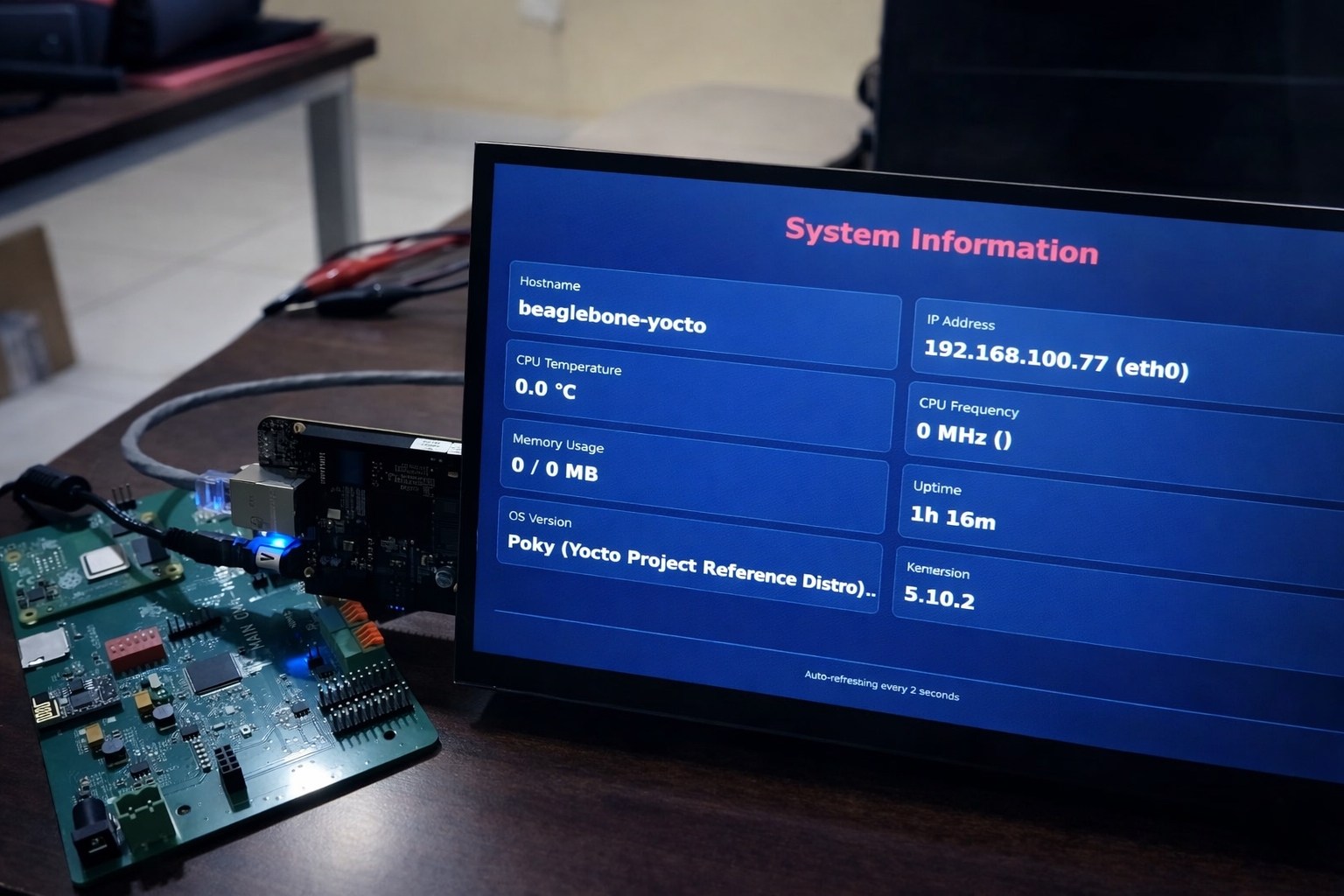
Our CM4 sits on our custom carrier board (SQOASIS-v1) with a 10.1-inch 1024x600 HDMI touchscreen. The touchscreen connects via USB and presents as standard HID, but the CM4's USB needs DWC2 in host mode with otg_mode=1. We handle this through a kernel config fragment in our layer.
The image includes the full Qt 6 module set — 32 modules including Quick3D, Charts, Multimedia, and Sensors. On hardware with 8GB RAM and GPU acceleration, there's no reason to be selective.
Adding the BeagleBone Black: Four Problems
Problem 1: Layer Dependencies
Our meta-qt6-fixes layer had a hard dependency on meta-raspberrypi:
LAYERDEPENDS_qt6-fixes = "qt6-layer raspberrypi"
The BBB build doesn't include meta-raspberrypi — it uses meta-yocto-bsp from Poky instead. Removing the dependency was step one:
LAYERDEPENDS_qt6-fixes = "qt6-layer"
But now BitBake complained about an orphaned bbappend — our linux-raspberrypi_%.bbappend had no matching recipe. BitBake treats unmatched bbappends as errors, not warnings.
We tried BBFILES:remove to exclude it. That didn't work — the remove happens before the glob expands. The solution was BBFILES_DYNAMIC, which conditionally includes files only when a named layer is present:
BBFILES_DYNAMIC += "raspberrypi:${LAYERDIR}/dynamic/raspberrypi/recipes-*/*/*.bbappend"
We moved the RPi-specific bbappend into dynamic/raspberrypi/. When the raspberrypi layer is in bblayers.conf, BitBake includes it. When it's not, the file doesn't exist as far as BitBake is concerned.
The psplash recipe had a similar issue — an :rpi machine override on SPLASH_IMAGES that only applied to Raspberry Pi. We removed the override to make it apply to all machines.
Problem 2: 512MB RAM
The first BBB image included all 32 Qt modules — same as the CM4. The kernel booted fine, systemd started, and then... nothing. The serial console showed:
systemd[1]: Installed transient /etc/machine-id file.
And stayed there. No login prompt. No error messages. We waited 45 minutes thinking it was a slow first-boot process.
The issue was memory exhaustion. We found a similar report on the meta-flutter project — the BBB's 512MB can't run Weston plus a full graphics framework without running out of memory. Services were failing silently because there wasn't enough RAM to log the failures.
The fix was aggressive. We cut the Qt module list from 32 to 5:
# BBB: minimal modules for 2D QML dashboard (512MB RAM)
IMAGE_INSTALL:append = " \
    qtbase \
    qtdeclarative \
    qtsvg \
    qtshadertools \
    qtwayland \
    "
After trimming, free -m showed 396MB available at idle. The system booted to a login prompt in under a minute.
Problem 3: Weston Won't Start — Pixel Format
With the slimmed image running, Weston still failed:
format XRGB8888 not supported by output HDMI-A-1
failed to create gbm surface
Failed to init output gl state
We tried the pixman renderer as a fallback:
weston --backend=drm-backend.so --renderer=pixman
Same failure, different message: failed to create kms fb: Invalid argument.
The BBB's TI tilcdc display controller doesn't support 32-bit pixel formats. We confirmed this by checking the active framebuffer:
cat /sys/kernel/debug/dri/0/framebuffer
# format=RG16 little-endian (0x36314752)
RG16 is RGB565 — 16-bit color. Every other format is rejected at the KMS level.
The fix was one line in weston.ini:
[output]
name=HDMI-A-1
mode=1024x600
gbm-format=rgb565
After adding this, Weston started immediately. We made it board-aware in the Yocto layer using FILESEXTRAPATHS with machine-specific directories:
FILESEXTRAPATHS:prepend := "${THISDIR}/${PN}/${MACHINE}:${THISDIR}/${PN}:"
weston-init/
├── weston.ini                      # Default (RPi, others)
└── beaglebone-yocto/
    └── weston.ini                  # BBB — rgb565 for tilcdc
BitBake searches the machine-named directory first. No conditionals in the recipe — just filesystem layout.
Problem 4: Flashing eMMC
The BBB boots from eMMC by default. To boot from SD, you hold the S2 button during power-on. We wanted the Yocto image on eMMC so the board boots without intervention.
The obvious approach:
dd if=/dev/mmcblk0 of=/dev/mmcblk1 bs=4M
This hung. Our SD card was 8GB, the eMMC is 4GB. dd was trying to write 8 billion bytes to a 4 billion byte device. BusyBox's dd doesn't support status=progress, so there was no indication of what was happening.
The Yocto wic image only uses ~500MB of partitions. The correct approach is to copy only the data that matters:
dd if=/dev/mmcblk0 of=/dev/mmcblk1 bs=4M count=250
sync
After flashing, we verified the partition layout:
fdisk -l /dev/mmcblk1
# p1: 32MB FAT (MLO + u-boot.img + zImage + DTBs)
# p2: 454MB ext4 (rootfs)
Remove the SD card, power on, Yocto boots from eMMC.
Development Workflow
The most important thing we established: you don't rebuild the full image to iterate on the application. After changing Qt source files:
# 1. Rebuild the recipe (~2-3 minutes)
docker compose run --rm yocto bash -c \
  'source layers/poky/oe-init-build-env build-bbb && \
   bitbake systeminfo -c cleansstate && bitbake systeminfo'

# 2. Deploy over SSH (seconds)
ssh root@192.168.100.77 systemctl stop systeminfo
scp build-bbb/tmp/work/cortexa8hf-neon-poky-linux-gnueabi/systeminfo/1.0/\
  packages-split/systeminfo/usr/bin/SystemInfo \
  root@192.168.100.77:/usr/bin/SystemInfo
ssh root@192.168.100.77 systemctl start systeminfo
Full image rebuilds are only needed for system-level changes — kernel options, new packages, display configuration.
Disk Space
Yocto builds consume serious disk space. At peak, our setup used over 300GB:
| Directory | Size | Can Delete? |
|---|---|---|
build-rpi4/tmp/ | 143 GB | Yes — rebuilds from sstate |
build-bbb/tmp/ | 156 GB | Yes — rebuilds from sstate |
sstate-cache/ | 24 GB | No — this is what makes rebuilds fast |
downloads/ | 15 GB | No — source tarballs |
The tmp/ directories contain every intermediate build artifact — unpacked sources, object files, staging directories. Deleting them and rebuilding from sstate cache takes minutes instead of hours.
What We'd Do Differently
Design layers board-agnostic from the start. We wrote meta-qt6-fixes for the RPi and had to retrofit multi-board support. BBFILES_DYNAMIC and machine-specific file overrides should be the default patterns for any custom layer, even if you only have one board today.
Profile memory budgets early. The full Qt 6 module set is 32 packages. On 8GB, that's fine. On 512MB, it causes silent boot failures that are difficult to diagnose without a serial console. Start minimal and add modules as needed.
Always have a serial console. The BBB's boot issues — systemd hanging, Weston failing — produced no useful output over HDMI or SSH. The J1 serial header at 115200 baud showed everything. For any new board bring-up, connect serial first.
Reproducing This
git clone https://github.com/learnqtkenya/yocto-qt6-builds
cd yocto-qt6-builds
mkdir -p layers && cd layers

git clone -b scarthgap git://git.yoctoproject.org/poky.git
git clone -b scarthgap git://git.yoctoproject.org/meta-raspberrypi
git clone -b scarthgap git://git.openembedded.org/meta-openembedded
git clone -b 6.10.2 https://code.qt.io/yocto/meta-qt6.git

cd ..
docker compose build
docker compose run --rm yocto bash -c \
  'source layers/poky/oe-init-build-env build-bbb && bitbake core-image-base'
The repository includes build configs for both boards, the custom layer with a reference Qt Quick app (SystemInfo), Dockerfile, and Docker Compose configuration. The README covers everything from setup to flashing to adding your own Qt application.
Related Articles